Your first shift with CafeDash
Tap Next to move through the walkthrough at your own pace, or read the steps below.
Watch the narrated setup video →
Quick visual reference
Download the first-shift graphic · Quick guides for everyday tasks →
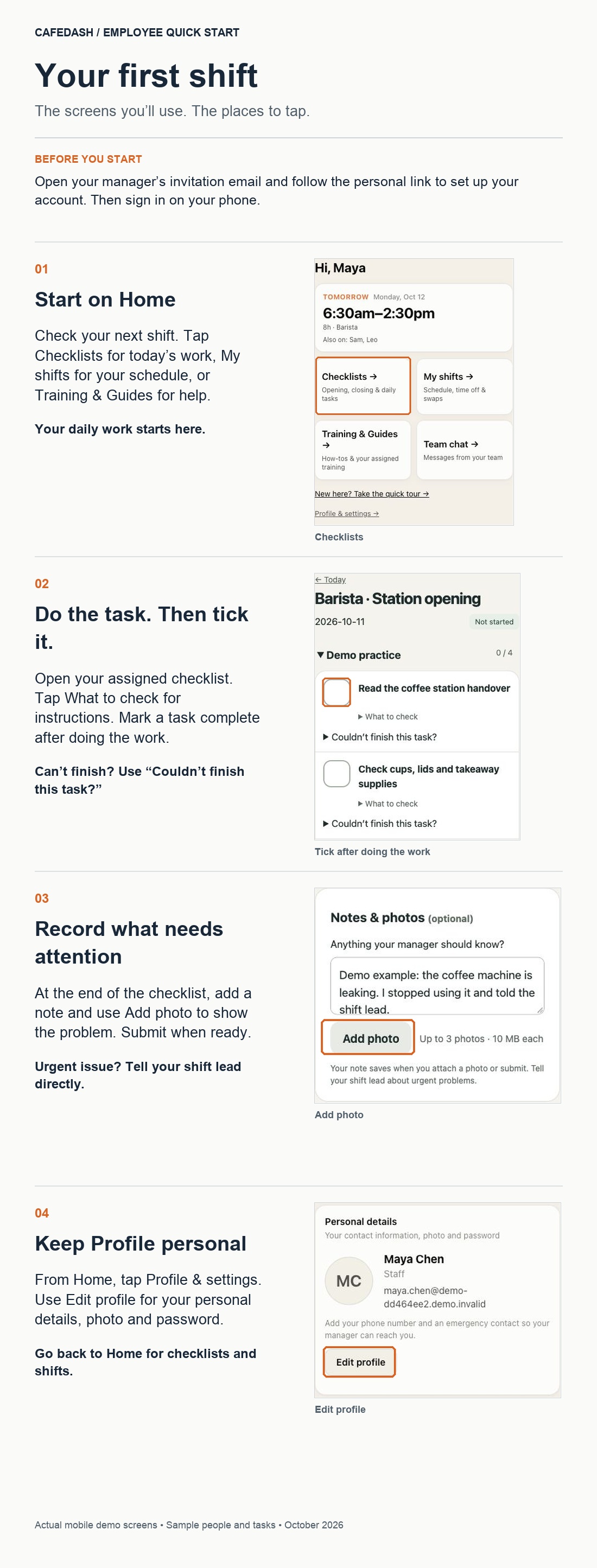
From invitation to first shiftIllustrative screens · your available options depend on your role
CAFEDASH · DEMO CAFÉ
Written steps
- Open the personal invitation email sent by your café. Check your email address, choose your password and select Create my account. If asked, set your tablet PIN or skip it for later.
- Employees land on Home. It shows your next shift and large links to your work. The example schedule is illustrative; your café supplies your actual shifts.
- Choose Checklists, open an assigned checklist and follow its instructions. Tick a task only after doing it.
- If something is broken or leaking, use Notes & photos at the end of the checklist. Write what happened, then use Add photo to choose or take a picture. Up to three JPG, PNG or WebP photos per checklist, 10 MB each. Keep people and private information out of the photo.
- For unfinished work, select Couldn't finish this task? and explain why. Tell your shift lead about urgent problems using your café’s reporting procedure; attaching a photo does not send an urgent alert. Submit the checklist when ready.
- Open Training & Guides for how-tos and café skills. Choose My training for assigned onboarding and documents. Use My shifts for your schedule, time off, availability and swaps. Use Team chat if your role has access.
- Use Profile to update personal details, your photo, notifications and certificates. Return to Home for everyday work.
Open my Home → · Phone setup instructions · Training & Guides